A QR code is a two-dimensional barcode that turns information into a square pattern of dark and light modules. A phone camera or compatible scanner reads that pattern and converts it back into useful information such as a website address, Wi-Fi configuration, contact card, message, location or event details. QR codes are valuable because they reduce typing and connect printed or physical material to a digital action. A good QR code is not just an image: it is a small user-interface element that needs a clear purpose, a trustworthy destination and reliable scanning in the environment where people will use it.
What information can a QR code contain?
QR codes can contain plain text or structured data. Common examples include URLs, telephone numbers, email addresses, SMS messages, Wi-Fi credentials, geographic coordinates, calendar events and vCards. The exact content type matters because different phone operating systems may offer different actions after a scan. A URL might open in the browser, a phone number may present a call option, while Wi-Fi data can offer to join a network.
More stored data usually creates a denser pattern. That can make the smallest modules harder to reproduce when the code is printed at a tiny size. For practical business use, encode only the information that is needed. A short, accurate destination is usually better than placing unnecessary text inside the code.
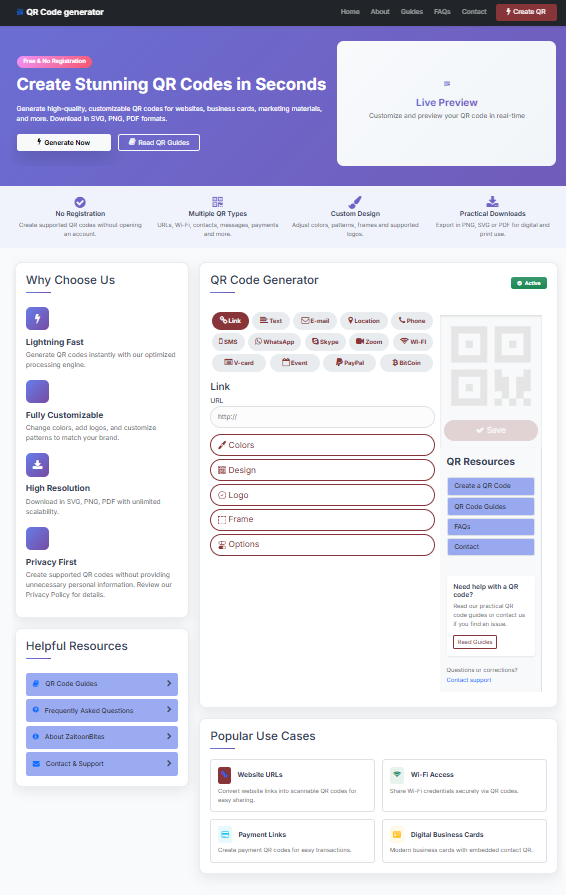
Original interface screenshot used in this guide
This guide uses an original screenshot from the ZaitoonBites generator interface so readers can see the real workspace behind the article. The screenshot shows the generator controls, preview panel and supporting resource links in the same layout a visitor uses before creating a QR code.
Generator workflow, preview panel and resource links.
Confirm that the guide explains the actual interface rather than a generic QR-code process.
Readers can compare the written steps with the real on-page tool before they generate their own code.
How does a smartphone scan a QR code?
A scanner first detects the large finder patterns near three corners of a QR code. Those patterns help the camera determine orientation, perspective and scale. The software then reads smaller modules, applies error-correction information and reconstructs the original data. Modern camera apps perform most of this work automatically and usually show a prompt before opening a website or taking another action.
Scanning therefore depends on more than the encoded content. Camera focus, lighting, viewing angle, module size, contrast and the blank quiet zone around the code can all affect recognition. A code that works perfectly on a computer monitor may behave differently on glossy packaging, a curved bottle or a small printed card.
Static and dynamic QR codes
A static QR code stores the final content directly in the pattern. If you encode a website address, that exact address becomes part of the QR code. Changing the destination later generally means generating a new code and replacing the printed version. Static codes are simple and can be useful for permanent URLs, contact data and Wi-Fi information.
A dynamic QR code commonly stores a managed redirect URL. The redirect can be changed later without changing the printed pattern, and some services add scan analytics. The trade-off is dependency on the provider, account, redirect domain and possibly a subscription. Choose dynamic only when editing or measurement is a genuine requirement.
Where QR codes are useful
QR codes are most useful when they remove friction. Restaurants can link a table card to a mobile menu; offices can share guest Wi-Fi; event organizers can link posters to registration; product packaging can open setup instructions; business cards can let a recipient save contact details; and printed marketing can lead directly to a campaign page.
Always explain the benefit next to the code. A short label such as “View menu”, “Connect to Wi-Fi”, “Open setup guide” or “Save contact” gives people a reason to scan. An unlabeled square asks users to take an action without telling them what will happen, which can reduce trust and engagement.
Design rules that improve reliability
Start with a dark pattern on a light, plain background. Preserve a clean margin around the code and avoid placing nearby text or decorative elements inside that quiet area. If you use brand colors, make sure the foreground and background remain visually distinct. Extremely pale colors, gradients with low contrast and busy photographs can make detection unreliable.
Logos and custom module shapes should be applied conservatively. Keep logos centered and modest in size, and never cover the large finder patterns. Every design change should be followed by a real scan test. A QR code that looks attractive but scans slowly is a poor design outcome.
Privacy and security considerations
A QR code can hide a destination from casual visual inspection, so users should be given enough context to understand what they are scanning. For public materials, use destinations you control or trust, prefer secure HTTPS pages and avoid unexpected redirects. If a QR code points to a form that collects personal information, explain the purpose of that collection and provide an appropriate privacy notice.
For Wi-Fi QR codes, remember that anyone who can scan the code may gain access to the encoded credentials. Businesses should normally use a separate guest network rather than exposing an internal staff network. Remove or replace printed QR codes when credentials or destinations change.
How to test before publishing
Test the final QR code with more than one phone and, where possible, both iOS and Android devices. Confirm not only that the code scans, but that the destination or action is correct. For website links, make sure the page loads quickly on mobile and does not show certificate warnings, broken layouts or missing content.
If the code will be printed, test a physical proof at the final size and on the intended material. Check normal viewing distance, typical lighting, reflections and folds. Re-test after a designer resizes, recolors or places the code into the final artwork because production changes can reduce scan quality.
Beginner checklist
Before publishing, confirm the content, destination, contrast, quiet zone, final size and real-device scan performance. Add a short call to action and keep the landing page current. If the destination may change in the future, plan how you will maintain it before printing large quantities.
These checks take only a few minutes and prevent the most common problems: outdated links, unreadable small modules, poor color choices and confusing user journeys. Treat the QR code as part of the complete customer experience rather than an isolated graphic.
Create and test your QR code
Use the generator, then apply the practical checks from this guide before you publish or print.
Open QR Generator